Talk it out. Get a checklist.
Hold ⌥⇧Space anywhere and ramble about everything on your mind. Nodemind turns it into a clean to-do list and a map of your thoughts. Speech and AI run entirely on your Mac, so nothing you say leaves it.
AI models (1.6 GB) download once, then it works offline
You said · 0:41
“Okay so… tomorrow I need to call Priya about the invoice, it's overdue. The slides for Monday still aren't done. Remind me to email Rahul about the contract before Friday. Oh and the car needs servicing, I keep forgetting…”
Nodemind made
- Call Priya about the overdue invoice
- Finish the slides for Monday
- Email Rahul about the contract renewal by Friday
- Book a car service
How it works
It lives in your menu bar. No typing, no formatting, no account.
Capture
Hold ⌥⇧Space or click the menu-bar icon and brain-dump. Words appear as you talk.
Organize
What you said is sorted into tasks, ideas, learnings, questions and decisions. Small talk is dropped. Tasks land on Today.
Search
Find ideas, decisions and tasks by meaning, not exact words. If nothing matches, it says so.
Map & meetings
On a call? Nodemind notes what you and they said, then writes the minutes. Your ideas and questions join a mind map that also shows where you get stuck.
How fast?
Everything runs on your Mac's own chip. Speech is transcribed at every pause while you talk, so there's almost nothing left to do when you stop.
| Step | Model | Time after you stop |
|---|---|---|
| Speech to text | Whisper small whisper.cpp, Metal, live at each pause | ~0.2 s |
| Checklist, topics, people | Qwen3.5 0.8B llama.cpp, Metal, passes in parallel | ~2–4 s |
| Search index | EmbeddingGemma 2 semantic memory search | < 0.1 s |
Measured on an M4 Pro MacBook with a 65-second English recording: each 8–12 s piece transcribes in ~0.24 s while you're still talking. Older Macs take longer.
Install
Fastest, no warning — paste in Terminal:
curl -fsSL https://raw.githubusercontent.com/abhishek085/Nodemind/main/scripts/install.sh | bash
Or the usual way:
Download
Get Nodemind-macOS.dmg from the button above.
Drag to Applications
Open the DMG and drag Nodemind into your Applications folder.
Allow it the first time
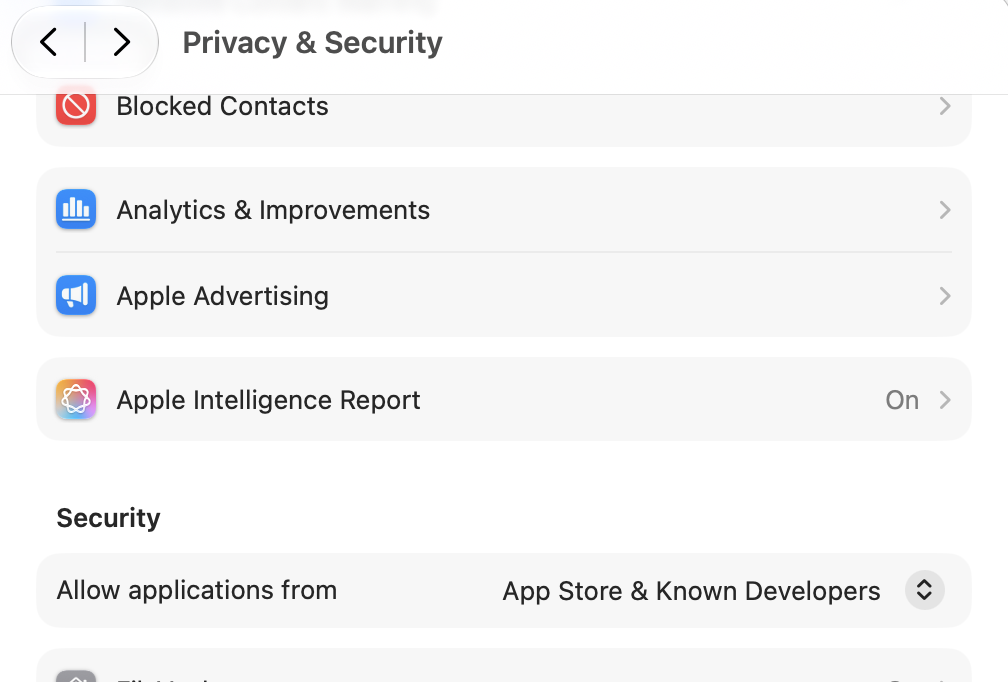
Nodemind isn't notarized by Apple yet, so macOS blocks the first open. Double-click it, click Done, then go to System Settings → Privacy & Security, scroll down and click Open Anyway. (Right-click → Open no longer works on recent macOS.)
Let it set up
Nodemind downloads its AI models once (1.6 GB), then lives in your menu bar. Approve the microphone the first time you record.
Why does macOS warn me? Is it safe?
The app isn't signed with an Apple Developer certificate. Apple only drops the warning for apps whose makers pay $99 a year and submit each release for scanning ("notarization"). Nodemind is free and open source and hasn't done that yet. The warning means "Apple hasn't reviewed this", not "this is harmful". Every line of code is public, and your voice and notes never leave your Mac.
Look for Open Anyway in the Security section of System Settings → Privacy & Security:
Private by design
- No account, no cloudThere's nothing to sign up for and no server that sees your words.
- Audio never leaves your MacRecordings are transcribed locally, then discarded.
- Your data, in one folderThoughts and tasks live in a local database you can open, back up or delete.
- Open sourceMIT-licensed. Read every line on GitHub.
Questions
Do I need internet?
Only once, to download the AI models on first launch. After that Nodemind works fully offline; the only other network call is an optional check for updates.
Which languages does it understand?
English, and Hinglish (Hindi mixed with English). Switch to Hinglish under the mic button. Your checklist is always written in English.
Does it work on Intel Macs?
Not yet. Nodemind needs an Apple Silicon Mac (M1 or newer).
How do meeting notes work?
Click "Take meeting notes" in the menu bar before a call. Nodemind records your mic and the call audio playing on your Mac separately, so it knows who said what, with no bot joining your call. When you stop, it writes a summary, decisions and action items, all on your Mac. Needs macOS 14.2 or newer; headphones give the cleanest notes. Let others know you're taking notes.
Is it really free?
Yes, and open source under the MIT license. There's no paid tier.
How do updates work?
Nodemind checks GitHub for new versions and asks before installing one.